Tag Archives: encoding review

Single-Pass vs Two-Pass VBR: Which is Better?

Let’s start this article with a quiz regarding how the quality and encoding speed of two-pass VBR (variable bitrate encoding) compares to single-pass VBR (that’s right, VBR in both cases). Choose the best answer. Two-pass takes twice as long as single-pass but delivers significantly better overall quality. Two-pass takes slightly longer than single-pass but delivers significantly better quality. Two-pass takes …

Read More »

The Impact of GOP Size on Video Quality

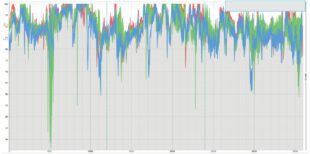
This freely downloadable report measures the qualitative impact of GOP sizes on animated, general entertainment, sports, and office footage for H.264 and HEVC. One of the most fundamental encoding decisions is GOP size or the frequency of I-frames in our encoded files. I-frames, also called keyframes, start each “group of pictures” comprised of I-, B-, and P-frames. Most of the …

Read More »

Comparing CPUs, GPUs, and ASICs for High-Volume Transcoding

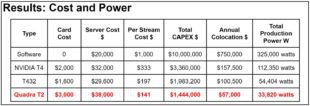
ASIC was the overall cost and performance leader.

This case study compares CAPEX, power consumption, and co-location costs for GPU, CPU, and ASIC-based transcoding.  This case study was derived from Ilya Mikhaelis‘ recent talk at NETINT’s symposium on Building Your Live Streaming Cloud. Images have been consolidated and modified slightly. You can view Ilya’s talk and download his slides here: bit.ly/vovs.   Ilya Mikhaelis is the streaming backend tech …

Read More »

Best SVT-AV1 Bitrate Control Technique for Live Streaming

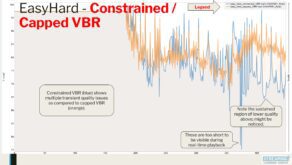
There are four bitrate control techniques worth considering for live encoding/transcoding using the SVT-AV1 codec. These are: Capped CRF VBR Capped VBR Constrained VBR Here’s what I found: Overall: Capped CRF shows promise with significant bitrate savings, good quality retention, and the best overall performance by ~10 – 25% (meaning more streams from the same hardware). VBR was generally the …

Read More »

Replace Bitrate Viewer with FFBitrateViewer

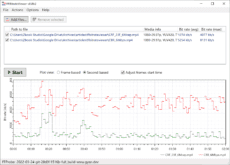
Recently I was asked to visually illustrate the data rate difference between two HEVC files, one encoded with CBR at 6 Mbps, the other using capped CRF with the same cap. Of course, everyone’s go-to bitrate visualization viewer has always been Bitrate Viewer, which does a great job displaying the bitrate of a single H.264-encoded file. Unfortunately, it can’t input …

Read More »

B-Frames, Ultra Low-Latency Encoding, and Parking Lot Rules

One of my sweetest memories of bringing up our two daughters was weekly trips to the grocery store. Each got a $5.00 bribe for accompanying their father, which they happily invested in various tchotchkes that seldom lasted the week. When we exited the car, “parking lot rules” always applied, which meant that each daughter held one of Daddy’s hands for …

Read More »

Which is the Best AWS CPU for FFmpeg?

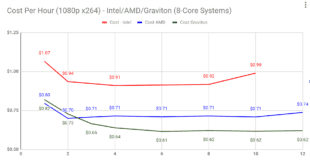
Figure 2. Cost per hour to produce a single 1080p stream using the x264 codec and FFmpeg. Graviton is clearly the most cost effective.

If you encode with FFmpeg on AWS, you probably know that you have three CPU options: AMD, Graviton, and Intel. Which is the best AWS CPU for FFmpeg? This article reveals all. For those in a hurry, it’s Graviton for x264 and AMD for x265, often by a significant margin. But the devil is always in the details, and if …

Read More »

The Correct Way to Choose an x264 Preset

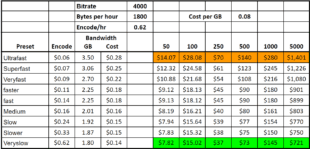
To choose the optimal x264 preset, you have to balance encoding and distribution costs. This article shows you how.  Over the last few years, I’ve used the first chart below to represent the tradeoffs associated with different presets and help readers (or listeners) choose a preset. To create the chart, you encode your test files to standard parameters using all …

Read More »

Encode on-Premise or in the Cloud

Deciding whether to encode on-premise or in the cloud is one of the most critical decisions facing any streaming publisher. Two recent articles provide both strong opinions and insights on this decision and are worthy of review. Our take? Do the math and make your own decision. The first article is “Why we’re leaving the cloud,” by David Heinemeir Hannson. …

Read More »

Running FFmpeg on Windows Subsystem for Linux

Choosing the Linux distro.

This post details how to install, update and add FFmpeg to Windows Subsystem for Linux so you can run Linux in Windows with minimal muss or fuss. Here’s why you might want to install WSL in the first place. I recently taught a session at Streaming Media East on using variables with FFmpeg (download handout here – note that free …

Read More »