 Streaming Learning Center Where Streaming Professionals Learn to Excel

Related Articles
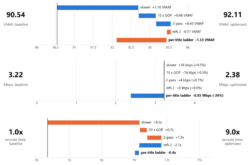

Wowza just released the Video Intelligence Framework, or VIF. According to my article in Streaming Media Magazine,
VIF is an AI inference module that runs inside Wowza Streaming Engine, rather than in a separate NVR/VMS stack or a cloud video AI service. It samples frames from streams already flowing through the engine, runs them through computer-vision models on a local GPU, and converts the results into structured events. As described in more detail below, VIF comes with several models, but it’s model-agnostic by design, so customers can use their own models or add third-party models for specific verticals.
My conclusion?
Taken together, these advantages put Wowza at the top of a very short list for Wowza Streaming Engine users needing to add AI analysis to their workflows, especially when they need on‑prem or air‑gapped operation. It also puts Wowza on the short list for developers choosing an engine for live-streaming applications that require AI analysis now or may in the future.
VIF is available on GitHub and has been detailed in this TV Technology article and this Wowza webinar.
To write the Streaming Media article, I had a long conversation with Wowza’s Krish Kumar (CEO), Mike Vitale (VP AI Strategy and Product Intelligence), and Viki Bonzo (Chief Software Architect). The following Q&A is a lightly edited version of that conversation. Wowza demoed VIF later in the conversation, and you can watch that demo here.
Contents
Opening and Background

Q: You’ve deployed hundreds of thousands of Wowza Streaming Engine instances over the years. How did that installed base shape your thinking about the need for a product like VIF?
Krish: Wowza has had numerous enterprise deployments across many use cases — air-gapped, cloud, and beyond. The biggest lesson across all of them is that most video today goes unwatched. As customers integrate video into their core workflows, applications, and platforms, they want two things: to gain deeper insight from the video they capture, and to take action on those insights in real time. Video is the richest source of data, yet customers who’ve invested heavily in video infrastructure tell us that most of it goes unwatched, and even when it is watched, no real-time action is taken. That macro problem led to the development of VIF.
Q: Before this, how are your typical media and sports customers implementing intelligence or AI on top of Wowza? And what did you see as the main limitations of those approaches?
Market education & validation
Would your product benefit from an independent technical analysis like this?
Our market education and validation service creates and distributes independent benchmarks, clear product explainers, and polished technical interviews. Proof that turns prospects into customers.
Learn how it works →Krish: AI is nothing new in video. Our customers used it in production for overlays, captions, DRM, and to gather insights after the fact. But that required a lot of infrastructure, engineering, and time, and the insights were archived rather than actioned. For real-time applications like traffic monitoring and mission-critical workflows like surgery and live sports, customers want insights immediately so they can act immediately. Doing that in real time was cost-prohibitive: encoding/decoding at the edge, pushing to large cloud providers for batch processing, then building systems to action the outputs. It took a lot of time, money, and energy just to gather basic insights.

Q: Do you have any user stories you can share about what they were doing before VIF and how they’re going to use it going forward?
Mike: We work with a lot of Department of Transportation clients. Today, a thousand cameras may be monitored, and clients have told us up to twenty minutes can pass before a staffer sees an incident. In that window there could be a traffic accident with no one watching. With VIF, they can monitor for specific events without needing someone to watch. We’re also working with a client on stadium security that want to know if a fight is happening or fireworks are going off. For that, VIF can monitor when no one’s around. Another client is doing offshore oil rig safety: submersibles looking for underwater leaks and cracks in infrastructure, monitored by a vision model when no human can watch.
What It Is: Native, Inline Intelligence
Q: For somebody who knows about Wowza Streaming Engine, how would you explain VIF in a single paragraph? Where does it sit? What problems does it solve?
Krish: For any customer using Wowza who wants to take action on an insight derived from video, VIF is your solution. It does three things. First, it makes your cameras intelligent centrally — no cameras left behind, including legacy systems that can now benefit from rapidly evolving VLMs and AI. Second, it lets you build programmatic workflows from those insights in a very simple way — sending a text, writing to a database, or triggering another application workflow. Third, it’s a powerful compliance feature: you can make sense of all your captured video in aggregate, even without the human power to watch it all.
Q: How many customers were doing this outside of Wowza with separate AI stacks? And what does it mean to have this inside of the Wowza Streaming Engine as opposed to outside?
Krish: Almost everybody in our customer base has an AI project, but there are three limitations. One is technological: breaking down video frame-by-frame across thousands of sources and processing it through a VLM is compute- and infrastructure-intensive, even for law enforcement and DOT customers with large budgets.
Two is cost: running commercial frontier models in the cloud gets very cost-prohibitive.
Three is data sovereignty: airports, law enforcement, smart cities, hospitals — they can’t have that data out in public and need control and compliance. VIF makes this simple: customers can deploy a custom model or use ours and get going in a matter of hours. Projects that typically took eighteen months to two years now take a month or two; multimillion-dollar projects are cut by a factor of 10; and much of the compliance and data governance scrutiny is removed.
Architecture and How It Works

Q: Can you walk us through the end-to-end architecture — from live ingest into Streaming Engine, through frame extraction, into the models, and out to events, metadata, overlays, clips?
Viki: A core principle for VIF was to be as performance- and latency-sensitive as possible — adding AI intelligence should never disrupt your existing video infrastructure. First, frame extraction happens inside Engine and supports all Engine ingest protocols, so there are no limits on what video formats you can analyze. Frame extraction is tightly integrated with the existing transcoding pipeline to keep preparation latency minimal. Frames are then sent to a separate process — the Video Intelligence Service — an intentional isolation so the AI runtime can never interfere with your video output.
The service performs preprocessing (each model has its own resolution and normalization requirements — all abstracted away), runs inference, then post-processes results — for example, upscaling detection coordinates back to the original resolution so overlays land correctly. Detections flow back to Engine, which supports five output formats: ID3 tags inline in your HLS stream, webhooks, burnt-in overlays, JSON-L log files, and custom Java listeners. Java listeners are where a lot of the power lies: with detections available in your own Java code, you can interact with Engine APIs — for example, when a specific class is detected, go back in the frame buffer, start recording a few seconds before, and record until your business logic rules are met.
Q: If you were going to compare this to a typical AI sidecar pattern, where does VIF remove complexity or latency in the workflow?
Viki: With a simple sidecar, you have to build pre- and post-processing case by case for every model. We abstract all of that away — every supported model works without additional effort. Latency is the other driver: most AI video workflows today are offline on VOD content, but for live video, latency is everything. Every step is optimized and tightly integrated with your video infrastructure. Different models have different profiles: object detection runs at millisecond scale, supporting very high inference frame rates, while VLMs need temporal context — batches of frames — and more time. Tight integration ensures customers can run this complex technology in the most performant way possible without worrying about the foundational pieces.
Q: So where does this run in practice? Is it on-prem, in the cloud, at the edge, all of the above? And how important was not needing to be online as a design constraint?
Mike: All of the above — exactly what we’ve traditionally supported with Engine. The stadium security client I mentioned is in Europe with legal requirements that the stream can never leave the facility, so everything runs in an on-site data center, fully on-premise. That difficult air-gapped use case is where we started, but we support everything through full cloud deployment.
Krish: We designed for three customer profiles. Edge-first customers, like live sports with massive camera investments, get both a cost and latency advantage processing on the edge. Regulated customers — governments and similar — need data on-prem plus control over models, training, and inference, often fully air-gapped. And hybrid IoT/industrial customers — factories, rigs — run VIF servers at the edge while doing large batch processing centrally in the cloud. We’re also seeing edge sensors and drones — small form factors with low power consumption — running VIF successfully.
Mike: One client is building private networks for government agencies where there’s no possibility of an outside connection, so deploying everything on a private network became crucial.
Q: Can you describe the bring-your-own-model architecture? How does a customer take a custom model they already have and connect it to the VIF pipeline without having to rearchitect their entire stack?
Viki: We support a specific open-source object detection architecture called RF-DETR — one of the most popular — because you can’t optimize performance without picking an architecture and sticking to it. If you already use it, integration is as simple as taking your PTH file and dropping it onto the machine where VIF is running — drag and drop, everything happens automatically.
If your architecture differs, the real asset is your training dataset, so we built a simple process to bring existing datasets and train an RF-DETR model — then it’s again a single-file drag and drop. Once deployed, the service automatically parses the model and exposes its available classes as strongly typed configuration options, and automatically converts the model to TensorRT — a hyper-optimized binary format tuned to your exact GPU architecture, driver version, and OS — for maximum inference performance.
Krish: Beyond open source, we’re also partnering with larger frontier model providers to bring best-in-class models — vertical-specific detection models and compliance models such as synthetic/fake video detection — giving customers maximum choice.
Q: How much of the work of frame routing, batching, and event formatting does VIF take off the customer’s plate when they bring their own models?
Mike: Engine handles all the frame routing. Because transcoding is built into Engine, we have fine-tuned control over how many frames per second are sent to the model for analysis.
Viki: The focus is abstracting complexity — none of that responsibility falls on the customer. We support three batching modes: frame-by-frame for models like object detection; frame batches for CLIP-family models and VLMs, where a temporal sequence lets the model detect actions across frames or perform
reasoning; and transmuxing frames into an MP4 container for models requiring MP4 input. Those three input formats cover the vast majority of image and video AI models on the market, letting us expand our catalog easily.
Q: What kind of models are included or pre-integrated out of the box — object detection, scene detection, demo pipelines — and how do those relate to the bring-your-own-model path?
Mike: For launch, we’ve taken a focused, curated approach to the model catalog. For object detection — finding “nouns” in a video stream — we support the RF-DETR architecture. For scene detection across frames, we’re shipping models like ViCLIP. On the VLM side, we’re shipping the Qwen family. Every model runs fully on-premise or at the edge with no external calls, and customers can always bring their own models — so the catalog is a starting point, not a boundary.
How Companies Do It Today vs. VIF
Q: What are the main patterns you’re seeing today for video intelligence — offline batch, external microservices, camera-embedded analytics — and what are the strengths and weaknesses of those approaches?
Mike: We’re not looking to compete with traditional VMS providers or offline batch processing — we see ourselves as a tool developers use to integrate with those platforms. There can be an upfront hardware investment — an NVIDIA RTX 6000, an H200, or something as small as an L4 card — but with a five-to-seven-year shelf life, it becomes a one-time sunk cost. All the tokens that would have gone to the cloud for processing are eliminated, and you get all the benefits of running on your own hardware.
Q: How does VIF change the economics, latency, and operational complexity of turning live streams into metadata, clips, and alerts?
Mike: The video is analyzed as close to where it enters the network as possible — truly at the edge, or when it first hits the network. Your “dumb” camera comes into Engine as RTMP, RTSP, or SRT, and right where transcoding happens, frames are analyzed. Latency is about as low as possible versus sending video out to the cloud.
Q: For the customer who already has a GPU-based AI pipeline, how would they integrate that stack into this rather than just replacing it?
Mike: A lot of our clients already use GPUs — cards doing NVENC/NVDEC for transcoding have a lot of unused CUDA capacity. Our inference takes advantage of that existing footprint, so there’s no additional hardware to purchase.
Viki: We ran extensive tests confirming that on NVIDIA GPUs, the NVENC/NVDEC cores dedicated to encode/decode conflict very little with the CUDA cores, which mostly sit idle. VIF spreads your AI inference across existing infrastructure — and if that’s not enough, you can offload stream analysis to additional machines or GPUs, scaling AI needs independently of your video streaming needs.
Mike: And we scale both vertically and horizontally — smaller cards per stream, or a larger NVIDIA footprint handling multiple streams.
Q: What performance targets did you design around — frame rates, resolutions, concurrent streams — and how does that map to a real deployment with dozens or hundreds of streams?
Viki: The only answer is flexibility. For object detection, we optimized for high frame rates — models take milliseconds per frame, so you can run 10, 15, 20, even 30 FPS. A good rule of thumb: the faster objects move relative to the camera, the more FPS you need. A wide-angle highway camera can run lower FPS; a close-up on a town square with people running needs more. Everything is configurable — frame rate, resolution, preprocessing — and adjustable at runtime. So with hundreds of cameras, you can run a low-FPS baseline or a lightweight VLM query as a trigger, and when something of interest is detected, bump up inference FPS on that camera dynamically to “pay more attention” and catch the interesting events.
System Requirements, Performance, and Scaling
Q: What are the system requirements and sizing considerations for running VIF alongside Streaming Engine — CPU, GPU, memory, and network?
Viki: Edge deployments are our main hardware target — we don’t want to require a cluster of eight H100s costing hundreds of thousands of dollars (though you can if you want). Minimum requirements: an NVIDIA GPU with Turing architecture or newer, drivers supporting CUDA 12.8+, 16 GB RAM for standalone Video Intelligence Service or 32 GB co-located with Engine, and 8 vCPU cores minimum (16 recommended).
Networking depends on topology: if Engine and VIF share the same Docker network, communication happens in memory with no real network requirement. Split across machines, a 30 FPS stream running 10 inference FPS on an average object detection model needs roughly 2–5 Mbps per stream depending on content complexity — a non-issue since most deployments are on the same private network.
Q: What percentage of your current customers can install VIF and not have to buy anything?
Mike: Pretty much 99% — most of our enterprise customers already run some form of NVIDIA hardware.
Viki: Turing is a common, older architecture — around 2018. The oldest GPU we support, the NVIDIA T4, is the most commonly deployed NVIDIA GPU for edge AI inference today, and it’s also the go-to GPU at hyperscalers like AWS and GCP. The vast majority of customers won’t need to upgrade.
Q: Can you share practical FPS and concurrency numbers from internal testing or early customers?
Viki: With the minimum requirements plus a T4 GPU, we ran both Engine and VIF on 10 1080p streams at nine inference FPS — a total of roughly 90 frames per second through an object detection model on a single T4. That aligns almost perfectly with public RF-DETR benchmarks, which proves the entire framework around the models adds an insignificant amount of latency end to end. The main cost is the AI inference itself, which can’t be reduced — but all the supporting logic can, and by integrating tightly with Engine, we’ve reduced it to the minimum possible.
Demos, Use Cases, and Value
Q: What demos do you have to show me today?
Mike: (Demo walkthrough.) VIF is built directly into Engine — streams come in, get packaged, and go out to CDNs as usual, with multiple models analyzing them simultaneously. Demos shown: a custom object detection model watching for safety/security incidents (smoke, fire); scene analysis detecting fights and fireworks in a stadium; and a VLM monitoring a stream and logging real-time descriptions of everything it sees, sent to a third-party system (Datadog for observability in the demo — anything supporting webhooks works). The VLM can be instructed to watch for specific highlights. Configuration is available via API or UI; models are swappable from a dropdown (e.g., a 4B-parameter Qwen model, upgradeable to 12B or 30B as hardware allows), making the deployment future-proof.
Viki: The demo also shows our analysis modes: describe mode narrates the scene; detect mode looks for specific actions or objects without any model training — emergent capabilities of the foundational model; and custom mode gives power users full access to the underlying prompts. Because VLMs can be non-deterministic, we also let customers define a strict JSON output schema the VLM is forced to follow — guaranteeing well-formed output for traditional software and third-party integrations.
Q: Looking at contextual advertising, what specific signals can this generate, and how do those improve ad relevance and CPM compared to traditional metadata?
Mike: By design, VIF isn’t a turnkey ad product — it gives developers the tools to enhance CPM performance. We use object detection to spot specific objects or logos in a scene and feed that to a third-party system, which can update a website or trigger interstitials — “this is happening in the video, show this specific ad.” A demo shows logo detection updating a website via ID3 tags.
Jan’s framing: Compared to traditional techniques, you simply don’t have that information — certainly not on a timely basis. With live video it’s very hard to get; even with VOD it’s cost-intensive.
Viki: How the signal is surfaced depends on the use case. Object detection is enough when you know exactly what your ad trigger is; for open-ended cases, VLMs come in — more horsepower, but the reasoning ceiling is quite high. Once you have the signal, all output pathways apply: ID3 tags inline, webhooks, or custom Java code integrating your back-end.
Q: Looking at the sports example, how fast can they go from a live event — a goal in a World Cup game — to a highlights package?
Mike: We can detect goals and crowds cheering, and send that as actionable data to third parties. Engine already has DVR capabilities with video stored in S3 or elsewhere, so tying “something interesting happened here” to the video for editing is straightforward. We provide all the tools — a developer could build a live highlights workflow in about an hour.
Q: What applications are you seeing that you didn’t expect? What are the surprise applications?
Mike: Synthetic video detection. With AI-generated content getting more convincing, we were asked to incorporate a live detector for whether video is synthetic or real — the team integrated it in about two days. In the demo, my real webcam is correctly identified as real, and an AI-generated fake webcam
feed is correctly flagged as synthetic. This is powerful for anti-fraud and KYC — and clients raised use cases we hadn’t imagined, like someone defrauding first responders by faking an emergency event.
Q: How are your customers thinking about this — a productivity play, higher CPMs, more inventory, or an infrastructure play?
Mike: A little of all of the above. Not needing eyes on every video is an obvious benefit; synthetic video detection is driven purely by fear of broadcasting something fake. I’ve been amazed at what clients are coming up with.
Q: What are the costs to implement this at this point?
Krish: That’s the beauty of VIF – most customers’ hardware is already supported. The incremental price on the subscription largely offsets the bespoke costs, plus normal development and DevOps costs for ongoing maintenance.