 Streaming Learning Center Where Streaming Professionals Learn to Excel

Related Articles


To choose the optimal x264 preset, you have to balance encoding and distribution costs. This article shows you how.
Over the last few years, I’ve used the first chart below to represent the tradeoffs associated with different presets and help readers (or listeners) choose a preset. To create the chart, you encode your test files to standard parameters using all the presets, measuring encoding time. Then you verify that the bitrates are similar, and then compute VMAF and low-frame VMAF on all the files. Low-frame VMAF is the lowest VMAF score for any frame in the video, an indicator of transient quality problems.
Contents
Presets and Quality
Then you average the scores and plot the results. The horizontal axis contains all the presets. The blue line is the percentage of encoding time each preset takes as compared to the placebo. The red line is the harmonic mean VMAF, and the green line is the low-frame VMAF.
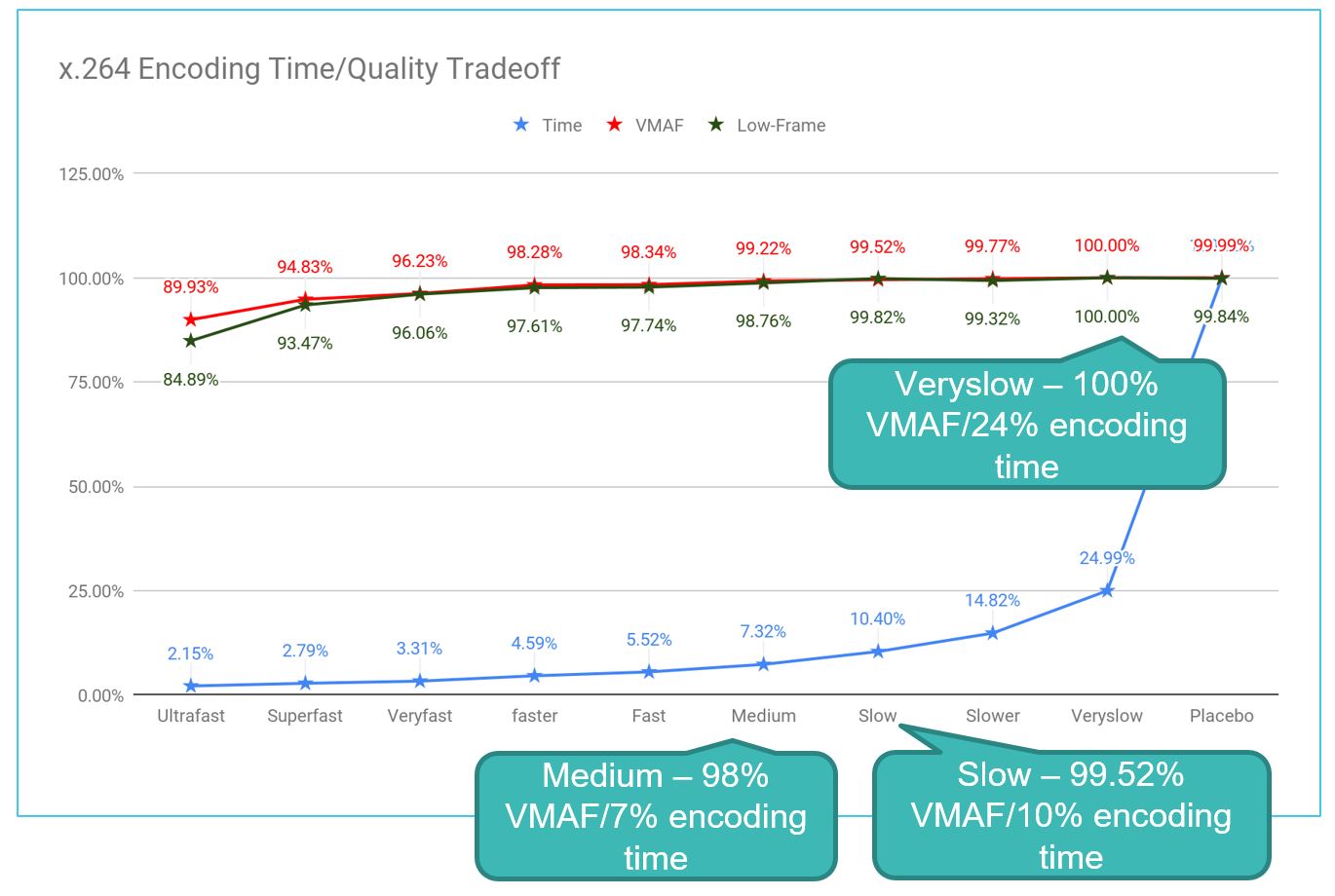
I assumed that once you performed this analysis with your own test files, you could get a pretty good idea of the tradeoffs for each preset and choose the optimal preset for your content. With my test files, the veryslow preset delivered the top quality, so placebo made no sense, while slow delivered 99.52% of the available overall quality in ten percent of the encoding time of placebo. Sounded pretty good to me.
Presets and Encoding Cost
But then, after saying and writing, “Choose a bitrate that delivers a VMAF score of 93-95 for your top rung video,” for the millionth time, it hit me. We don’t choose a preset to set encoding quality. We choose a preset to control encoding cost. If you choose a lower-quality preset, you’ll save encoding time and costs, but you’ll have to increase your bandwidth to achieve your quality target.
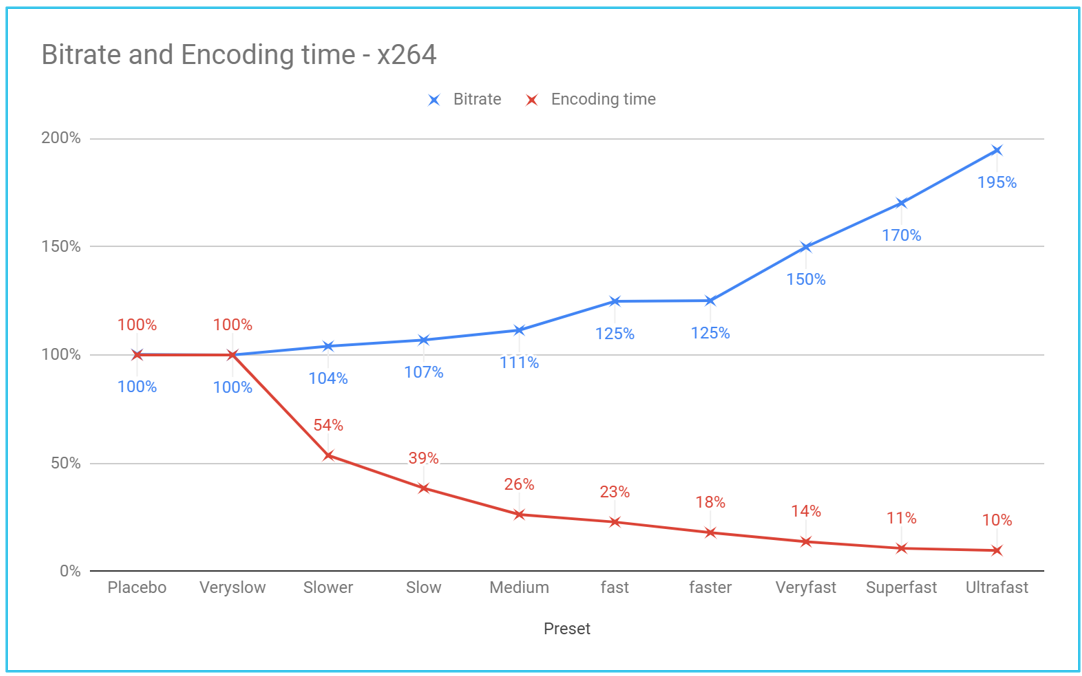
This led me to create another chart like that below. The red line tracks the decrease in encoding time, while the blue line is the bitrate percentage necessary to achieve the same quality as veryslow. Since placebo took four times longer than veryslow and produced slightly lower quality, I ignored placebo and computed both timing and bitrate deltas from the veryslow preset. That’s why the timing numbers are different from those above.
Choosing the Optimal x264 Preset
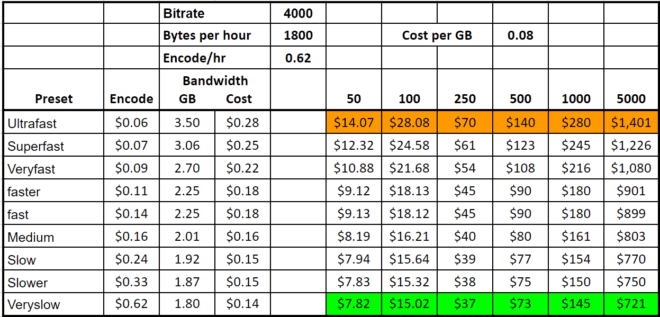
Then it becomes a breakeven exercise that depends upon the assumed bitrate (4 Mbps for 1080p 30 H.264), the encoding cost per hour ($0.62), and the cost per GB of bandwidth ($0.08). At this bandwidth cost (second tier on Amazon Cloudfront), the veryslow preset is the cheapest option from the get-go. This changes slightly as the bandwidth costs drop to $0.04 and $0.02 cents, but the bottom line is that after you distribute 250 hours of video, the highest quality preset always delivers the lowest cost.
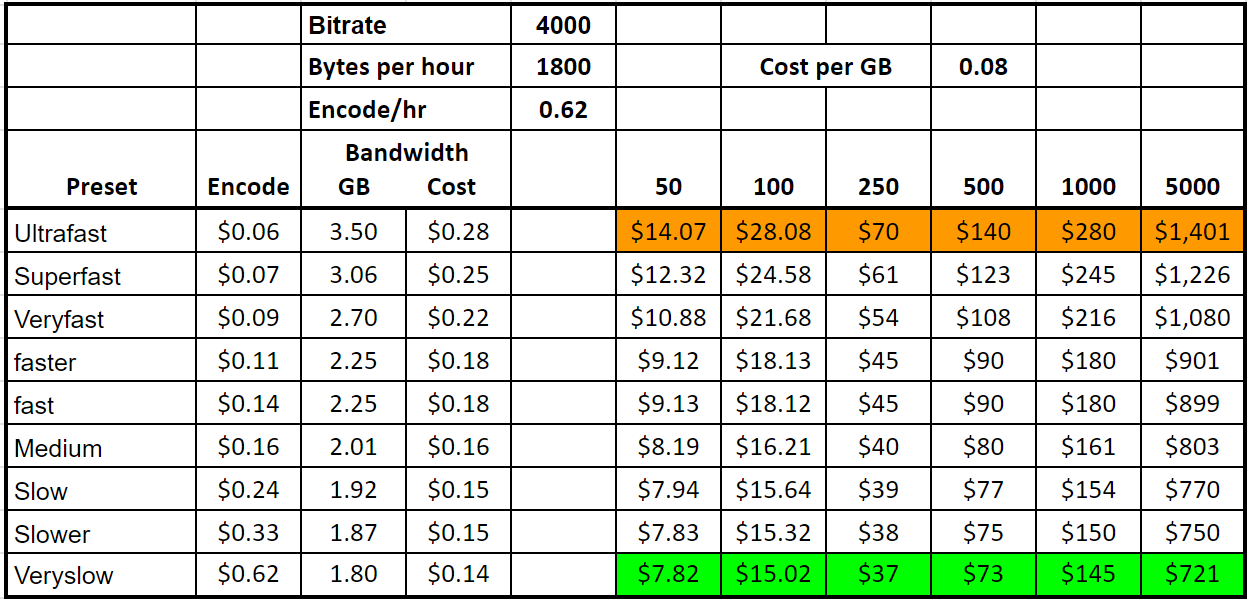
A complete lesson detailing these findings with links to the bottom spreadsheet is now available in my course, Streaming Media 101: Technical Onboarding for Streaming Media Professionals. I’ll be adding two similar analyses for HEVC (1080p30/8-bit, 4K/10bit) over the next couple of weeks. While the numbers are different, the overall findings are similar. The bottom line is that if your typical video gets over 500 or 1,000 views, it almost certainly makes sense to use the highest possible quality preset to get the bandwidth as low as possible.
I will say that your results for the different presets will vary with your test files and encoding and distribution costs, and you should definitely run your own tests. But if you follow this methodology and analysis, I’d be surprised if your results are meaningfully different.
Encoding cost & efficiency review
Impressed with this analysis? Your encoding ladder deserves the same scrutiny.
Our encoding cost and efficiency review tests your ladders and codec configurations on your own content, cutting bandwidth spend without sacrificing quality. You get lower delivery bills and better viewer QoE.
See how it works →Finally, anytime you post a blog with this many numbers, there’s a decent chance that there’s an error or two. If you spot one, or what you think is one, please drop me a line at janozer@gmail.com and let me know.