 Streaming Learning Center Where Streaming Professionals Learn to Excel

Related Articles


Here are three things to know about 2-pass x265 encoding with FFmpeg.
- If you’re using -pass 1 and -pass 2 in your command string, it’s probably not working. You must use x265-params 0:pass=1 and then x265-params 0:pass=2 in the second pass. In the way we absolutely love about FFmpeg, there’s no error message if you use -pass 1/-pass 2; it just takes twice as long, and you end up with the exact same file you would get if you simply used single-pass encoding.
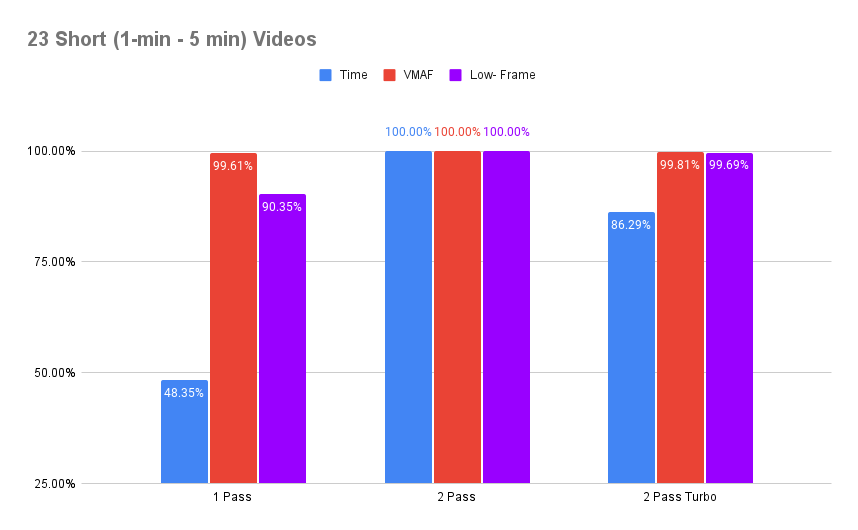
- Unless you use the no-slow-firstpass=1 option, two-pass encoding will take about twice as long as 1-pass with no meaningful overall quality difference, though about a 10% advantage in the low-frame score. Since 1-pass is slightly better than 2x faster than two-pass and about the same quality, single-pass encoding is definitely worth considering.
- If you do use the no-slow-firstpass=1 option, it shaves about 14% of your encoding time with no quality penalty.
Let’s address point by point.
Contents
Perfecting the Two-Pass Command String
When x265 first became available in FFmpeg, you accessed most configurations vai the x265-params switch. If you didn’t, FFmpeg ran without error but simply ignored all the configuration options set without x265-params. Over time, more and more configuration options became accessible via normal FFmpeg commands, but apparently not passes.
When I first tested one-pass vs. two-pass I used the -pass command, and the two-pass file was the same as the 1-pass file, though it took twice as long to encode. I tried the x265-params switch, and though 2-pass again took twice as long as single pass, the files were different.
Note that with x264, 2-pass takes nowhere near twice as long to encode (see here). A bit of research revealed the no-slow-firstpass switch that I used to accelerate encoding by about 14%. In an attempt to determine if there were any faster options, I wrote a quick blog entitled, What’s the Best Setting for x265 Two-Pass Encoding? Asking whether anyone knew of any faster options. I heard nothing back.
I’ll show the complete command strings down below.
Accelerate Encoding Via the no-slow-firstpass=1 Option
As mentioned, once I got 2-pass working, I looked for options to speed it up, and found the no-slow-firstpass=1 option. Here’s the command string I used, showing both this switch and the correct configuration for two-pass encoding. I also closed the GOP with open-gop=0, which is recommended for ABR packaging (see here).
ffmpeg -y -i football.mp4 -c:v libx265 -preset medium -threads 8 -b:v 3500k -maxrate 7000k -bufsize 7000k -g 60 -x265-params open-gop=0:pass=1:no-slow-firstpass=1 -f mp4 NUL
ffmpeg -y -i football.mp4 -c:v libx265 -preset medium -threads 8 -b:v 3500k -maxrate 7000k -bufsize 7000k -g 60 -x265-params open-gop=0:pass=2 -an football_2pass_turbo.mp4
Encoding cost & efficiency review
Impressed with this analysis? Your encoding ladder deserves the same scrutiny.
Our encoding cost and efficiency review tests your ladders and codec configurations on your own content, cutting bandwidth spend without sacrificing quality. You get lower delivery bills and better viewer QoE.
See how it works →As I’ll show with the quality results below, this shaved from 14% – 22% of encoding time from the tested clips with similar or better quality than regular 2-pass encoding. If you’re encoding with regular 2-pass encoding with x265 in FFmpeg, this is a switch you should consider deploying.
The Results Please
I ran two sets of tests, one set on 23 files ranging from 1-5 minutes in five genres: animation, office, 30 fps sports, 60 fps sports, and general entertainment. The other set of tests was on two files about 12 minutes long; complete versions of Netflix’s Meridian and Blenders’ Tears of Steel. Table 1 shows results for the 23 mixed-genre files; note that file sizes were all within about 2%.

Figure 1 shows the data on a percentage basis. As stated, 1-pass delivered about the same overall quality as two-pass in slightly faster than 2x the encoding time. The low-frame score measures the potential for transient quality differences, and a roughly 10% delta translates to about 7 VMAF points, which a viewer might notice if the duration of the low quality region is more than 1-2 frames. If that concerns you, you can opt for the roughly 14% savings delivered by the turbo mode with insignificant differences in VMAF and low frame score.
Meridian/Tears of Steel
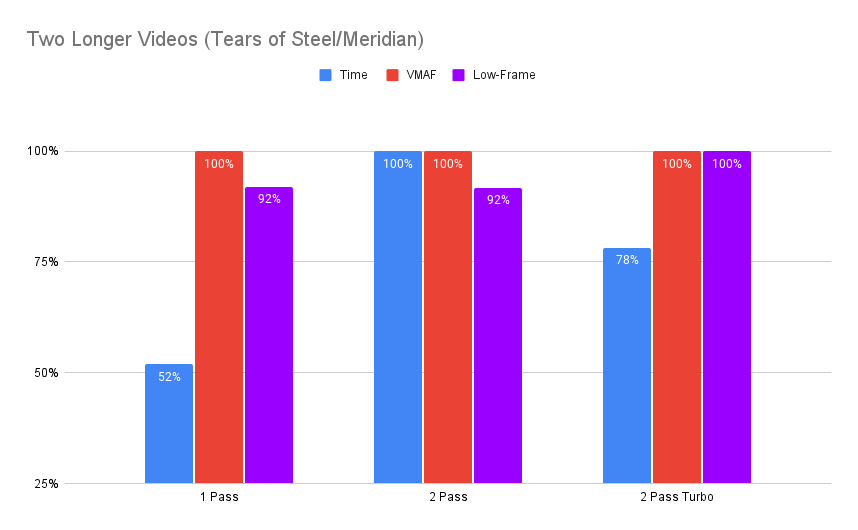
Table 2 shows the results with the 12-minute-ish 1080p versions of Meridian and Tears of Steel.
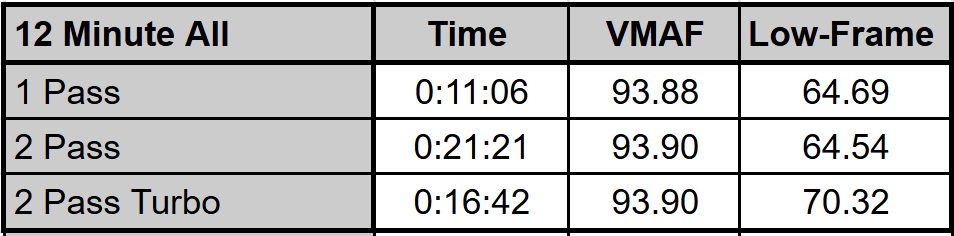
Here, the time savings for 1-pass and 2-pass turbo were 48% and 22%, respectively, with nearly identical VMAF quality. In this case, the low-frame score for 2-pass turbo was higher than 2-pass regular speed, making the turbo mode the best overall option from both a quality and encoding speed perspective.
How to Use This Data
If you’re encoding with x265 using 2-pass mode, you should check if your results are consistent with mine and make whatever adjustments you see fit. If you have a technique that accelerates two-pass encoding even further, I’d appreciate hearing about it (jan.ozer@streaminglearningcenter.com).





Thank you Jan. I had missed the x265-params.
Merci!
Done that myself more times than I care to share.
🙂